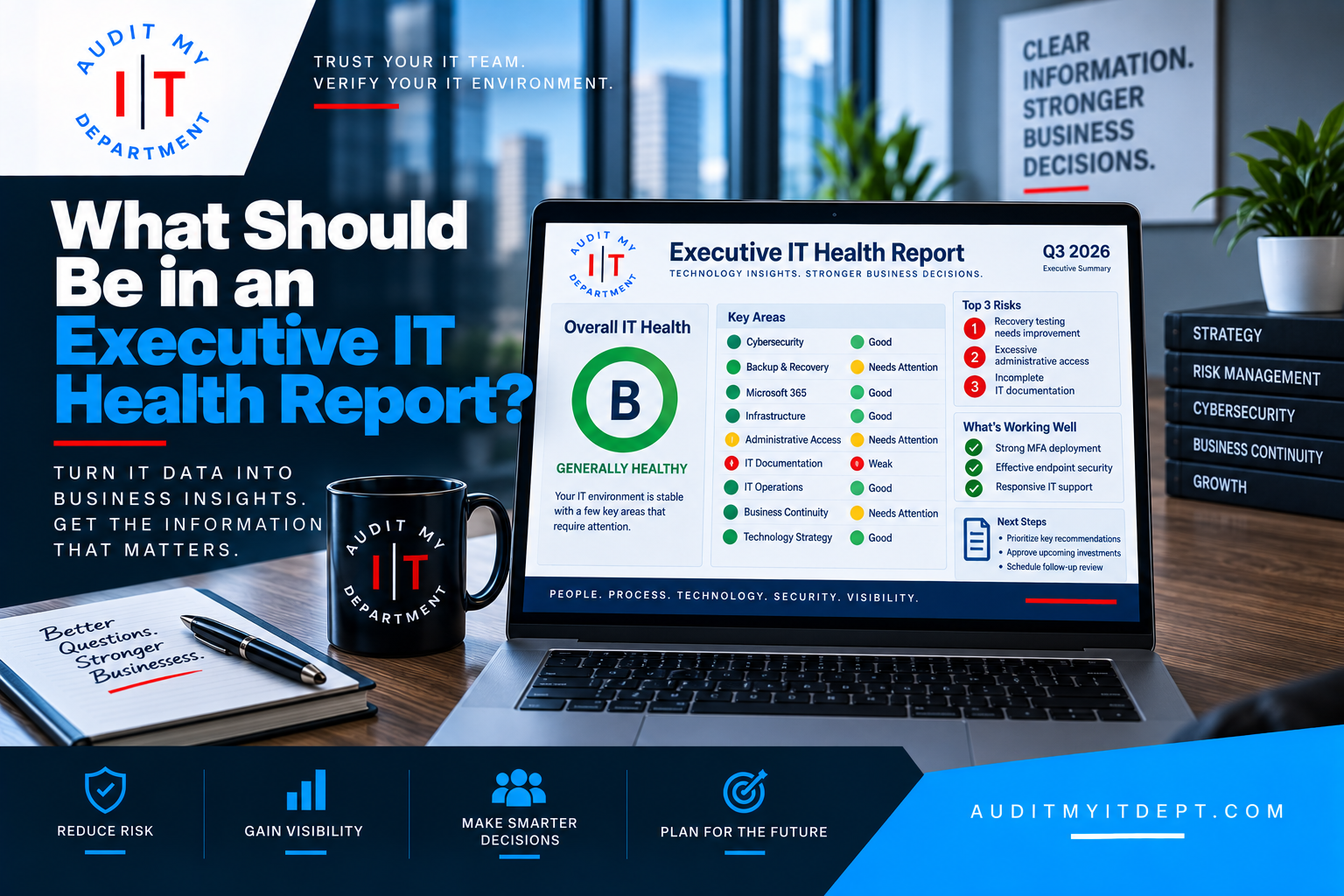
What Should Be in an Executive IT Health Report?
Most business leaders don’t need another technical report.
They already have enough reports.
Financial reports.
Sales reports.
Operations reports.
Insurance reports.
HR reports.
Then IT hands them a 60-page document filled with:
- Patch statistics
- Ticket counts
- CPU utilization
- Storage percentages
- Security alerts
- Device inventories
- Technical acronyms
There’s nothing inherently wrong with that information.
IT professionals may need it.
But the CEO probably doesn’t.
Leadership needs something different.
An executive IT health report should tell leadership whether technology is supporting the business, where meaningful risks exist, and what decisions need to be made.
That’s a very different report.
So what should it contain?
Start With One Question: How Healthy Is Our IT?
Imagine you’re the CEO.
You receive an IT report.
The first thing you should be able to determine is:
“Overall, how healthy is our technology environment?”
Not after reading 50 pages.
Not after scheduling another meeting.
It should be apparent from the executive summary.
That doesn’t mean reducing a complicated technology environment to a meaningless green checkmark.
It means giving leadership a high-level view before presenting the details.
For example, an organization might receive an overall IT health rating of:
Strong
Generally Healthy
Needs Attention
Elevated Risk
Critical Attention Required
Or a scoring system might be used.
The specific format matters less than the principle:
Leadership should quickly understand the overall condition of IT.
1. Overall IT Health
The report should begin with an overall assessment.
That assessment should consider multiple areas rather than cybersecurity alone.
For example:
| Area | Example Status |
|---|---|
| Cybersecurity | Good |
| Backup & Recovery | Needs Attention |
| Microsoft 365 | Good |
| Administrative Access | Needs Attention |
| IT Documentation | Weak |
| Infrastructure | Good |
| IT Operations | Good |
| Business Continuity | Needs Attention |
| Technology Strategy | Good |
Now leadership has a picture.
Immediately.
The next question becomes:
“Why are those three areas marked Needs Attention?”
That’s exactly the conversation the report should create.
2. Executive Summary
The next section should explain the overall situation in plain business language.
For example:
The organization’s IT environment is generally well managed, with strong endpoint security, current infrastructure, and effective Microsoft 365 administration.
However, recovery testing, IT documentation, and administrative-access controls require additional attention.
No immediate operational crisis was identified, but these areas should be addressed to reduce business-continuity and cybersecurity risk.
That’s useful to leadership.
It answers:
Are we okay?
What are we doing well?
What concerns you?
How urgent is it?
No technical expertise required.
3. Top IT Risks
Every executive IT health report should identify the organization’s most significant technology risks.
Not fifty risks.
Start with the most important ones.
For example:
Risk #1 — Recovery Has Not Been Recently Tested
Backups are running successfully, but a full recovery test has not been performed recently.
Risk #2 — Excessive Administrative Access
Several accounts retain administrative privileges that may no longer be necessary.
Risk #3 — Incomplete IT Documentation
Critical network and recovery information depends heavily on individual IT personnel.
Risk #4 — Aging Infrastructure
A critical server is approaching the end of its planned lifecycle.
Risk #5 — Incomplete Business-Continuity Planning
Technical recovery exists, but broader operational recovery procedures are not fully documented.
Now leadership knows where to focus.
4. What’s Working Well
This section is often forgotten.
An IT assessment shouldn’t only document problems.
Leadership should know what IT is doing well.
Perhaps the organization has:
- Strong MFA deployment
- Reliable endpoint security
- Effective security monitoring
- Current firewalls
- Well-managed Microsoft 365
- Good patch compliance
- Strong employee offboarding
- Tested backups
- Excellent documentation
- Effective help-desk operations
Those accomplishments should appear in the report.
Good IT work deserves to be visible.
This is particularly important when evaluating an internal IT department or managed service provider.
An independent assessment should be fair.
If something is being done well, say so.
5. Cybersecurity Health
Leadership should receive a concise cybersecurity summary.
It might cover areas such as:
- Multifactor authentication
- Endpoint protection
- Email security
- Security monitoring
- Administrative access
- Patch management
- Remote access
- Employee security awareness
- Incident-response readiness
The report shouldn’t simply list security products.
For example:
Endpoint Security: Installed
doesn’t tell leadership much.
A more useful statement might be:
Endpoint protection is deployed across company-managed workstations and centrally monitored. No significant coverage gaps were identified during the assessment.
Or:
Endpoint protection is deployed, but several devices are not currently reporting to the management console and should be investigated.
That’s actionable.
6. Backup and Recovery Health
Backup status deserves its own section.
Leadership should understand:
- What critical systems are protected
- Whether backup jobs are monitored
- Whether failures are addressed
- Whether copies are appropriately protected
- When recovery was last tested
- Expected recovery capability
- Significant gaps
The report should distinguish between:
Backup Success
and
Recovery Confidence
Those are not necessarily the same thing.
A system may show successful backup jobs while recovery has never been independently demonstrated.
Leadership should understand the difference.
7. Microsoft 365 Health
For many businesses, Microsoft 365 is one of their most important technology platforms.
An executive report may summarize areas such as:
- MFA coverage
- Administrative accounts
- Former employee accounts
- External sharing
- Licensing
- Email protection
- Privileged access
- Account security
- Retention and recovery considerations
Again, the report shouldn’t overwhelm leadership with configuration details.
Instead of showing every Microsoft 365 setting, explain the meaningful findings.
For example:
Good
MFA is appropriately deployed for normal users and administrators.
Needs Attention
Several inactive accounts remain licensed and should be reviewed.
Higher Priority
A legacy administrator account is not protected with the expected authentication controls.
That’s information leadership can act on.
8. Administrative Access
Executives should understand who controls critical technology.
The report should address privileged access to systems such as:
- Microsoft 365
- Servers
- Firewalls
- Network equipment
- Backup platforms
- Cloud services
- Cybersecurity systems
- Domain registration
- DNS
- Critical applications
Leadership doesn’t need passwords.
It needs assurance that privileged access is:
Known
Necessary
Protected
Documented
Reviewed
Administrative access is too important to be invisible.
9. IT Documentation Health
The report should evaluate whether another qualified IT professional could understand the environment if key personnel became unavailable.
Areas might include:
- Network documentation
- Hardware inventory
- Software inventory
- Vendor information
- Backup procedures
- Recovery procedures
- Administrative access
- Critical applications
- Onboarding and offboarding
- Technology policies
Documentation should also be evaluated for accuracy.
A network diagram from five years ago isn’t necessarily useful documentation today.
10. Infrastructure Health
Leadership should know whether major technology components are:
- Current
- Supported
- Reliable
- Approaching replacement
- Creating unnecessary risk
The report might summarize:
Servers
Healthy; no immediate replacement required.
Firewalls
Supported, but replacement should be budgeted within 18 months.
Workstations
Approximately 20% of devices are approaching the organization’s normal replacement lifecycle.
Wireless Network
No significant concerns identified.
Now the CFO can start thinking about budget before something fails.
11. IT Operations
An executive report should also address whether day-to-day IT appears to be functioning effectively.
That may include:
- Help desk
- Monitoring
- Patching
- Employee onboarding
- Employee offboarding
- Vendor management
- Change management
- Project management
- Recurring problems
Leadership doesn’t need every ticket.
It needs trends.
For example:
Help-desk volume is stable, but recurring connectivity issues at one location account for a significant portion of support requests and should be investigated as an infrastructure problem rather than repeatedly treated as individual tickets.
That’s useful management information.
12. Business Continuity
An organization can have excellent IT tools and still be poorly prepared for a serious disruption.
The executive report should answer:
“Could the business continue operating if important technology became unavailable?”
Consider:
- Internet outages
- Server failures
- Cloud outages
- Ransomware
- Power failures
- Key-person absence
- Vendor failures
- Office disruption
The report should identify significant dependencies and recovery concerns.
13. Key-Person Risk
This deserves specific attention.
If one person knows everything about the technology environment, leadership should know.
That might be:
- An internal IT manager
- A system administrator
- An outside consultant
- One person at the MSP
- A longtime employee
Ask:
“What happens if this person becomes unavailable for 30 days?”
A health report should identify significant knowledge or access dependencies.
That’s not criticism of the employee.
In fact, the most capable IT professional can sometimes create the greatest dependency because so much knowledge accumulates with them.
The solution is documentation, cross-training, and appropriate access—not blame.
14. Technology Ownership
Leadership should understand whether the business retains appropriate ownership and control over critical technology.
The report may examine:
- Domain registration
- Microsoft 365
- Website hosting
- DNS
- Cloud platforms
- Software licenses
- Backup systems
- Security platforms
- Vendor accounts
A managed provider may administer these services.
That’s normal.
But the organization should not unknowingly lose control of important business assets.
15. IT Spending and Licensing
An executive health report can also identify areas where technology spending deserves attention.
Examples might include:
- Unused Microsoft 365 licenses
- Former employee subscriptions
- Duplicate security products
- Aging vendor contracts
- Unused services
- Upcoming hardware expenses
The purpose isn’t simply to cut IT spending.
Sometimes the report will conclude that the business needs to spend more.
Perhaps security is underfunded.
Perhaps infrastructure needs replacement.
Perhaps IT needs additional staffing.
Good IT oversight isn’t about making IT cheaper.
It’s about making technology spending intentional.
16. Technology Roadmap
One of the most valuable parts of an executive report is looking forward.
Leadership should understand what technology decisions may be approaching over the next:
90 days
12 months
24 months
36 months
Potential projects could include:
- Server replacement
- Firewall replacement
- Microsoft 365 improvements
- Security enhancements
- Backup modernization
- Cloud migration
- Network upgrades
- Computer replacement
- Documentation projects
- Business-continuity planning
This transforms IT from reactive spending into strategic planning.
17. Recommendations Should Be Prioritized
This is critical.
Imagine receiving an IT report containing 73 recommendations.
Which one should you address first?
Without prioritization, leadership may choose based on:
- Cost
- Convenience
- Whoever complains loudest
- Whatever is easiest
That’s not risk management.
Recommendations should be categorized.
For example:
Critical
Address immediately.
High Priority
Address within the near term.
Medium Priority
Plan and budget.
Strategic
Consider as part of longer-term technology planning.
Now leadership has a roadmap rather than a problem list.
18. Every Finding Should Explain Why It Matters
Consider this finding:
“Firewall firmware is outdated.”
Leadership may not understand the significance.
A better finding might be:
Finding
The primary firewall is running an outdated software version.
Business Impact
Outdated network-security software may contain known security or reliability issues and may not receive the protections available in current versions.
Recommendation
Review compatibility and upgrade to a supported version.
Priority
High.
Now leadership understands the issue.
Technical findings should always connect to business impact.
19. Identify Who Owns the Next Step
Recommendations often fail because nobody owns them.
The report should help establish responsibility.
For example:
| Recommendation | Owner | Target |
|---|---|---|
| Test disaster recovery | IT Provider | 30 Days |
| Review admin accounts | IT | 30 Days |
| Replace aging server | Leadership + IT | 6 Months |
| Update IT documentation | IT | 90 Days |
| Review cyber insurance | Leadership | Next Renewal |
The exact structure can vary.
But recommendations become more useful when someone is responsible for moving them forward.
20. Tell Leadership What Decisions Are Required
Perhaps the most useful section of the entire report is:
DECISIONS REQUIRED FROM LEADERSHIP
Imagine seeing:
Decision 1
Approve replacement of the aging production server.
Decision 2
Determine acceptable recovery-time requirements for the accounting system.
Decision 3
Approve additional Microsoft 365 security licensing.
Decision 4
Determine whether the business accepts or mitigates a documented legacy-system risk.
That’s executive IT governance.
IT identifies the technical issue.
Leadership makes the business decision.
What Should NOT Dominate an Executive IT Report?
The executive report shouldn’t primarily consist of:
- Raw log files
- IP addresses
- Patch IDs
- Security-event counts
- CPU statistics
- Technical screenshots
- Long hardware inventories
- Acronyms without explanation
Those details may belong in supporting technical documentation.
But the executive report should focus on:
Risk
Impact
Priority
Cost
Responsibility
Decision
That’s what leadership needs.
The One-Page CEO View
If possible, the entire report should have a one-page executive dashboard.
Imagine something like:
Overall IT Health: B
Cybersecurity: B+
Backup & Recovery: C+
Microsoft 365: B
Infrastructure: B+
Documentation: C
IT Operations: B
Business Continuity: C+
Top 3 Risks
- Recovery testing needs improvement.
- IT documentation is incomplete.
- Aging infrastructure requires planning.
Top 3 Strengths
- Strong MFA deployment.
- Effective endpoint security.
- Responsive IT support.
Decisions Required
- Approve recovery-testing project.
- Budget infrastructure replacement.
- Assign responsibility for documentation improvements.
Now a CEO can understand the situation in minutes.
The technical team can still receive the detailed report.
A Good Report Should Start a Conversation
The report itself isn’t the end.
It’s the beginning of better IT governance.
Leadership should sit down with IT and discuss:
What surprised us?
What are we doing well?
What’s our biggest risk?
What should we fix first?
What requires budget?
What can wait?
What does IT need from leadership?
When will we review progress?
That’s where the real value appears.
Your IT Team Should See the Report Too
An independent IT assessment shouldn’t create two competing sides:
Management vs. IT.
The IT team should have an opportunity to provide context and understand findings.
Perhaps the audit identifies aging infrastructure.
IT may respond:
“We’ve been recommending replacement for two years.”
That’s important.
Perhaps the assessment identifies excellent backup practices.
Leadership should know IT deserves credit.
Perhaps a finding is based on incomplete information.
IT should be able to clarify it.
A fair assessment should make IT stronger—not create unnecessary conflict.
Independent Doesn’t Mean Adversarial
This is central to the philosophy behind Audit My IT Department.
Independent verification doesn’t mean:
We assume your IT department is bad.
It means:
We aren’t the people responsible for managing the environment we’re evaluating.
That independence creates another perspective.
Sometimes it uncovers gaps.
Sometimes it validates concerns IT has already raised.
Sometimes it confirms the environment is being managed exceptionally well.
Every one of those outcomes can help leadership.
What Should Leadership Know After Reading the Report?
A CEO should finish an executive IT health report knowing:
How healthy is our IT?
What are we doing well?
What are our biggest risks?
Can we recover?
Is our cybersecurity appropriate?
Who controls our critical systems?
Is our IT properly documented?
Are we dependent on one person or provider?
What technology expenses are approaching?
What should we address first?
What decisions does leadership need to make?
If the report answers those questions, it has done its job.
From IT Data to Business Intelligence
IT departments generate enormous amounts of technical information.
That’s not the problem.
The challenge is turning that information into something leadership can use.
The CEO doesn’t need another dashboard showing how many patches were installed.
The CEO needs to know:
“Is there a meaningful risk I need to understand or a decision I need to make?”
That’s the difference between an IT report and an executive IT health report.
Trust Your IT Team. Verify Your IT Environment.
Your IT department may be doing excellent work.
Your managed IT provider may be delivering exactly what it promised.
Your cybersecurity may be strong.
Your backups may be recoverable.
Your infrastructure may be healthy.
Your documentation may be excellent.
An independent IT health assessment can confirm those things.
And if weaknesses exist, leadership receives something even more valuable:
A prioritized path forward.
Do You Know the Health of Your IT Environment?
Audit My IT Department provides independent IT assessments designed specifically for business owners, CEOs, CFOs, and leadership teams.
We evaluate areas including:
Cybersecurity
Backup & Disaster Recovery
Microsoft 365
Administrative Access
IT Documentation
Infrastructure
IT Operations
Business Continuity
Technology Strategy
Then we translate the findings into an executive view designed to answer three questions:
Where are we now?
What matters most?
What should we do next?
Trust your IT team. Verify your IT environment.
REQUEST AN IT AUDIT
847-281-5953
AuditMyITDept.com